We define what your website should achieve, test how it performs and share the evidence with you. Speed, accessibility, reliable journeys and commercial KPIs become clear checks and practical improvements—from the first brief to the next release.
A website is a working part of your business: people must be able to find it, read it, use it and complete a task. Measurement belongs in the project from the start. For every objective, we define the evidence that will tell us whether the work is ready and what to improve. KPIs are the agreed measures of success, from loading speed to relevant enquiries.
01
Agree the target
Turn “fast”, “accessible” and “easy to use” into acceptance criteria for named pages and journeys. Record the starting point, devices, test conditions and business KPIs.
02
Build, test, correct
Check performance, accessibility and technical quality during development. Test a real enquiry or booking journey, correct failures and rerun the relevant checks.
03
Show the evidence
Share dated reports, tested pages and devices, completed checks and remaining issues. Explain the results and the agreed exceptions before handover.
04
Review, improve, retest
After launch, compare meaningful KPIs and user feedback with the baseline. Prioritise a change, name its owner and check the result. Review frequency and ongoing work are agreed in scope.
A real report. An inspectable result.
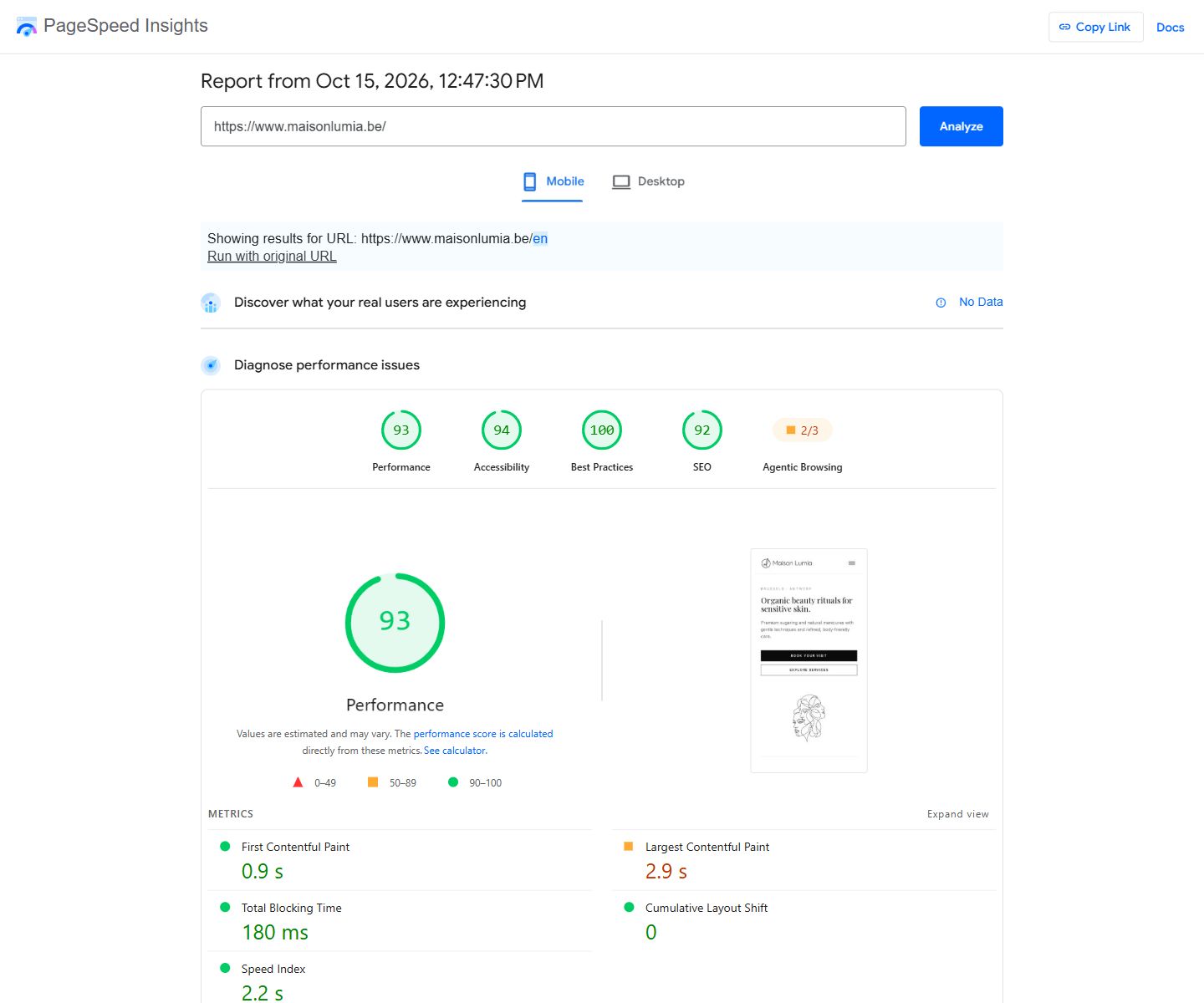
Maison Lumia illustrates how technical delivery can be checked independently. The dated Google PageSpeed Insights capture below shows the public website’s results and gives the client a report they can open themselves.
Maison Lumia · public website · Google PageSpeed Insights · mobile · 15 October 2026. The report tested the redirected English homepage.
Performance
93/100
Accessibility
94/100
Best practices
100/100
SEO
92/100
This report gives a concrete review list: image delivery, text contrast, heading order and link descriptions. The mobile lab LCP was 2.9 s; CLS was 0. These findings provide the starting point for a correction log and a repeat test.
A dated test is a snapshot, not a permanent guarantee. Scores change with content, deployment and test conditions. This run has no real-user field data; its lab results do not establish a Core Web Vitals field pass, full accessibility conformance or a commercial outcome.
Standards give us a shared reference. Tools help test the work. Your benefit is a site that is easier to use, maintain and assess, with evidence you can understand.
Core Web Vitals
Core Web Vitals describe loading (LCP), interaction response (INP) and layout movement (CLS). Their good thresholds are ≤ 2.5 s, ≤ 200 ms and ≤ 0.1 at the 75th percentile of visits.
Loading, responsiveness and visual stability affect whether visitors can comfortably use the site.
What we check and share
Dated lab results plus real-user metrics where available. Lab tests help diagnose; real-user data shows experience over time.
WCAG 2.2
WCAG means Web Content Accessibility Guidelines. WCAG 2.2 AA guides checks for contrast, keyboard use, focus, labels and alternatives. Normal text generally needs 4.5:1 contrast; large text 3:1.
More people can read the content, navigate and complete forms, including people using a keyboard or assistive technology.
What we check and share
Automated findings plus manual checks of the agreed pages and complete journeys. An automated accessibility score alone does not establish WCAG conformance.
Lighthouse
Lighthouse is an automated audit tool for performance, accessibility, best practices and SEO. Its category scores identify issues under a particular test setup.
Search engines can more easily discover and understand the content that explains your expertise.
What we check and share
A technical search checklist and Search Console checks where access and data are available. Indexing and ranking are not guaranteed.
W3C HTML
HTML is the structural language of the web. W3C markup validation helps identify invalid structure; semantic headings, links and form controls also need practical review.
Clear structure helps browsers and assistive tools interpret the page and makes future changes easier.
What we check and share
Relevant validation findings, structure checks and browser tests. Valid markup alone does not prove accessibility or usability.
OWASP ASVS
OWASP ASVS is a reference for verifying web application security controls. Applicable checks depend on the site: public forms, authentication, permissions and data connections need different attention.
Forms, accounts and connected tools have defined safeguards rather than security being an afterthought.
What we check and share
The agreed security checks and remediation record. The test scope is stated; a Lighthouse best-practices score is not a security audit.
We identify the applicable criteria and test scope for your project. Meeting a target is demonstrated by evidence; a whole-site conformance or security claim needs its corresponding complete evaluation. Measurement is part of delivery, while optional visitor tracking remains subject to the appropriate consent choices.
From first visit to paid work.
Each stage answers a different question. We agree what counts, where the evidence comes from and who keeps it up to date.
01
Discovery
Search visibility, campaign source, landing page and language, where available.
Search appearances, visits and individual people are different measures.
02
Visitor action
A contact click, a form interaction or a handoff to a booking tool.
A telephone, email or booking link click does not confirm a conversation or a reservation.
03
Received enquiry
A successfully received form or an agreed record in your enquiry system.
Define receipt, check failed submissions and distinguish duplicates and spam.
04
Qualified opportunity
Your team records whether the request fits, the service needed and the next step.
Qualification needs business judgement and consistent staff feedback.
05
Proposal & won work
Quotation and opportunity statuses from your commercial tool.
A proposal is not a sale. Won value is not invoiced revenue; timing matters.
06
Payment received
Payment status from an agreed invoicing or accounting source.
Invoiced, paid, refunded and overdue are separate states. This stage needs reliable matching.
Start with the stages you need. CRM, booking and invoicing records can extend the view; commercial detail does not all belong in browser analytics.
The format should make a decision easier. Here is how questions, evidence and responsibilities can sit together in a concise review.
Illustrative report structure — no client results
01
Question
Are the right prospects getting in touch?
Evidence & limits
Received enquiries and staff qualification reasons. Review missing feedback and poor-fit patterns.
Next action
Clarify a priority service page or the questions in the enquiry form.
Owner
Business lead + Webility
02
Question
Which campaigns deserve attention?
Evidence & limits
Spend, enquiries and qualified opportunities for comparable periods. Allow for missing sources and sales delays.
Next action
Review a campaign or landing-page hypothesis before changing the budget.
Owner
Marketing lead
03
Question
Where does follow-up slow down?
Evidence & limits
Receipt and first-response timestamps, where reliably captured. Automatic acknowledgements are not personal replies.
Next action
Agree assignment, ownership or reminders at the recurring delay.
Owner
Sales / operations lead
04
Question
Does another language audience need a different journey?
Evidence & limits
Service, language and enquiry feedback, with enough evidence to compare. Small samples need care.
Next action
Refine the relevant page and the follow-up in that language.
Owner
Content + commercial lead
A quiet month may call for reviewing individual enquiries and customer feedback rather than a percentage. Note changes in spend, season, offer and tracking. A before-and-after comparison alone does not establish what caused a result.
A clear scope. Something you can use.
01
Define the measurement
Agree the business questions, event and status definitions, sources, baseline, review period and named owners. Identify access and consent requirements.
Your output: a measurement plan.
02
Set up & verify
Implement agreed tracking, check successful and failed actions, handle duplicates and define source tagging. Use existing tools, or build a custom view when justified.
Your output: a checked setup, a report and documented limitations.
03
Review & improve
Bring lead-quality feedback into an agreed review, explain the findings and record the next decisions. Identify who will carry out each improvement.
Your output: a concise review and action list.
Initial setup, recurring analysis, campaign management, custom connections and software subscriptions are separate scopes. Review frequency, account access, handover and support are agreed for your project. A reporting subscription is not a requirement for every website.
The right question depends on the business.
Ten illustrative measurement scenarios. These show what could be built around your workflow; they are not client results or claims of completed reporting projects.
01Consulting & engineering
Question & evidence
Which specialisms attract suitable briefs? Compare service and language context with staff-reviewed project fit.
A useful next decision
Clarify a specialist offer or improve project qualification questions.
02Accounting & administration
Question & evidence
Where does onboarding stall? Review enquiry status and checklist completion with restricted access to client records.
A useful next decision
Improve instructions or reminders at a recurring missing step.
03Specialist recruitment
Question & evidence
Do employer briefs and candidate applications reach the right route? Keep role/source context and ATS or CRM statuses separate.
A useful next decision
Improve one intake path. An application is not a commercial lead.
04Training
Question & evidence
Which course pages lead to confirmed registrations? Compare course enquiries or checkout with registration records.
A useful next decision
Improve course information or registration steps. Attendance is a separate event.
05Property
Question & evidence
Which listings generate relevant viewing requests? Connect listing references with staff-confirmed viewing statuses.
A useful next decision
Improve listing detail or follow-up. A request and a completed viewing are different.
06Construction & renovation
Question & evidence
Which requests fit the project type and service area? Review brief categories, agreed territory and quotation statuses.
A useful next decision
Clarify coverage and project requirements before the enquiry is sent.
07Appointment-based services
Question & evidence
Where do requests become confirmed appointments? Compare the website handoff with booking statuses.
A useful next decision
Improve booking guidance. Cancellations and attendance need booking records; keep sensitive appointment details out of browser analytics.
08Retail & commerce
Question & evidence
Where do checkout attempts become paid orders? Compare commerce events with order and payment records.
A useful next decision
Investigate checkout friction, refunds and channel costs. Sales alone do not establish margin.
09Hospitality
Question & evidence
Which offers lead to confirmed reservations? Review offer pages and reservation records, where access is available.
A useful next decision
Improve package information or the booking handoff. An external link click is not a reservation.
10Environment & technical services
Question & evidence
Which information leads to complete assessment requests? Review service and region context with staff-confirmed file readiness.
A useful next decision
Clarify required documents or preparation. Professional conclusions remain with qualified staff.